Home  /  pandapower GUI

A pandapower GUI in your browser

Draw your network as a single-line diagram and run pandapower load flow, IEC 60909 short circuit, optimal power flow, time series and N-1 contingency — without writing the net by hand. Import an existing pandapower script, or export the Python code and keep working in your notebook.

Nothing to install Import and export pandapower files pandapower, OpenDSS and ANDES Apache 2.0 open source

No signup to explore the editor · Pay only when you run cloud simulations

pandapower studies you can run from the diagram

Every study runs on the pandapower engine on our servers. The same diagram also runs the other engines where they fit better. Full documentation →

From pandapower files to a diagram and back

1. Import or draw

Open a .py file that defines a pandapower net and Electrisim draws the buses, lines, transformers, loads and generators for you. Or start from a blank diagram or a built-in example.

2. Run and read results

Pick a study, set the options in a dialog and run. Results appear on the diagram, with a network health dashboard and a PDF engineering report.

3. Export the code

Tick Export Pandapower Python Code to get a script of the same network and keep working in Python or Jupyter.
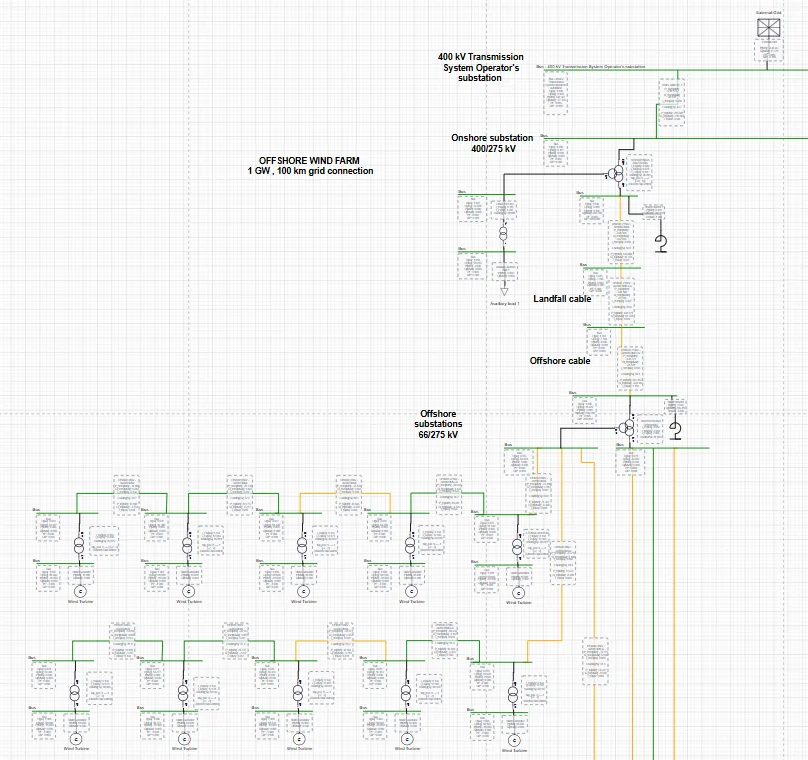
Electrisim editor with the single-line diagram of a 1 GW offshore wind farm
A network in the Electrisim editor. Every element maps to a pandapower table.

Scripts or a GUI? Use both

Use plain pandapower for custom scripts and large automated studies. Use Electrisim when you want a diagram, quick studies and reports — or both: export the code.

Task pandapower in Python pandapower in Electrisim
Build the network create_bus, create_line, … in code Draw it, or import your .py
Read results net.res_bus and other tables On the diagram, dashboard and PDF report
Other engines pandapower only OpenDSS and ANDES on the same diagram
Setup Python environment and packages A browser; nothing to install
Automation Full scripting control Export the Python code when you need it
Cost Free, open source Editor free; cloud studies from $10 per month; Community Edition free

Related guides

pandapower GUI FAQ

  • pandapower is a Python library. It includes plotting functions but no graphical network editor. Electrisim adds a diagram editor in the browser and runs pandapower on the server.
  • Yes. Save a .py file that defines a net object and open it with File → Import from → Device. Buses, lines, transformers, loads and generators are placed on the diagram, ready to check and run.
  • Yes. Tick Export Pandapower Python Code in a study dialog to download a script of the network, and Export Pandapower Results for the results.
  • Load flow with six algorithms, IEC 60909 short circuit (and ANSI/IEEE C37 in beta), optimal power flow, time series, N-1 contingency, controllers, protection, arc flash, grid-code P-Q and V-Q, BESS design and sizing, and steady-state motor starting.
  • The editor is free to explore in the browser. Running cloud studies starts at $10 per month, and the open-source Community Edition is free to self-host under Apache 2.0.

Draw your first pandapower network

Open the editor in your browser, no signup needed. Subscribe when you want to run cloud studies.

Open the editor free