Home  /  OpenDSS GUI

An OpenDSS GUI in your browser

Draw distribution feeders as a single-line diagram and run OpenDSS without writing .dss scripts by hand: load flow in snapshot, daily, yearly and duty-cycle modes, fault studies, harmonics and Monte Carlo. Import an existing circuit, or export the OpenDSS commands.

Nothing to install Import and export OpenDSS files pandapower, OpenDSS and ANDES Apache 2.0 open source

No signup to explore the editor · Pay only when you run cloud simulations

OpenDSS studies you can run from the diagram

Every study runs on the OpenDSS engine on our servers. The same diagram also runs the other engines where they fit better. Full documentation →

From OpenDSS files to a diagram and back

1. Import or draw

Open a .dss circuit and Electrisim draws the buses, lines, transformers, loads, generators and capacitors or reactors. Or start from a blank diagram or a built-in tutorial network.

2. Run and read results

Pick the OpenDSS tab in a study dialog and run. Results appear on the diagram, with charts for time-varying modes and a PDF engineering report.

3. Export the commands

Tick Export OpenDSS Commands to get the circuit as OpenDSS script and keep working with OpenDSS or OpenDSSDirect.py.
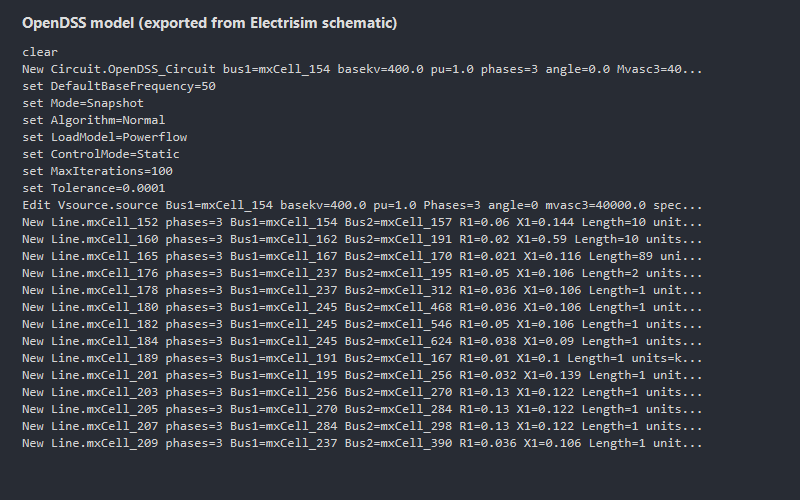
OpenDSS commands exported from an Electrisim diagram
OpenDSS commands exported from a diagram drawn in Electrisim.

Scripts or a GUI? Use both

Use OpenDSS scripts for custom automation and research code. Use Electrisim when you want a diagram, quick studies and reports — or both: export the commands.

Task OpenDSS with scripts OpenDSS in Electrisim
Build the circuit New Line.… commands in a text file Draw it, or import your .dss
Read results Exported text and CSV files On the diagram, charts and PDF report
Other engines OpenDSS only pandapower and ANDES on the same diagram
Setup Windows program, or Python with OpenDSSDirect.py A browser; nothing to install
Automation Full scripting control Export the OpenDSS commands when you need them
Cost Free, open source (EPRI) Editor free; cloud studies from $10 per month; Community Edition free

Related guides

OpenDSS GUI FAQ

  • EPRI’s OpenDSS program for Windows comes with a script editor: you describe the circuit as text commands. Electrisim adds a diagram editor in the browser and runs OpenDSS on the server through OpenDSSDirect.py.
  • Yes. Open a .dss circuit file with File → Import from → Device. Buses, lines, transformers, loads, generators and capacitors or reactors are placed on the diagram, ready to check and run.
  • Yes. OpenDSS solves unbalanced, multi-phase networks, and Electrisim has single-phase sources, transformers, lines, loads and generators where you choose the phase and the wye or delta connection.
  • Yes. Tick Export OpenDSS Commands in a study dialog to download the circuit as script, and Export OpenDSS Results for the results.
  • The editor is free to explore in the browser. Running cloud studies starts at $10 per month, and the open-source Community Edition is free to self-host under Apache 2.0.

Draw your first OpenDSS circuit

Open the editor in your browser, no signup needed. Subscribe when you want to run cloud studies.

Open the editor free