Comparison of software for load flow calculation: how the results are checked
Before you rely on a load flow program, you want to know that its answer matches what another trusted program gives for the same network. This page describes how Electrisim’s results are checked, what published comparisons between load flow tools show, and how to compare a model yourself.
Electrisim does not have a solver of its own. It builds the network from the diagram and solves it with open-source engines: pandapower for balanced load flow, OpenDSS for unbalanced and distribution networks, and ANDES for dynamics. So there are two questions: does Electrisim pass the network to the engine correctly, and does the engine solve it correctly?
Electrisim compared with pandapower
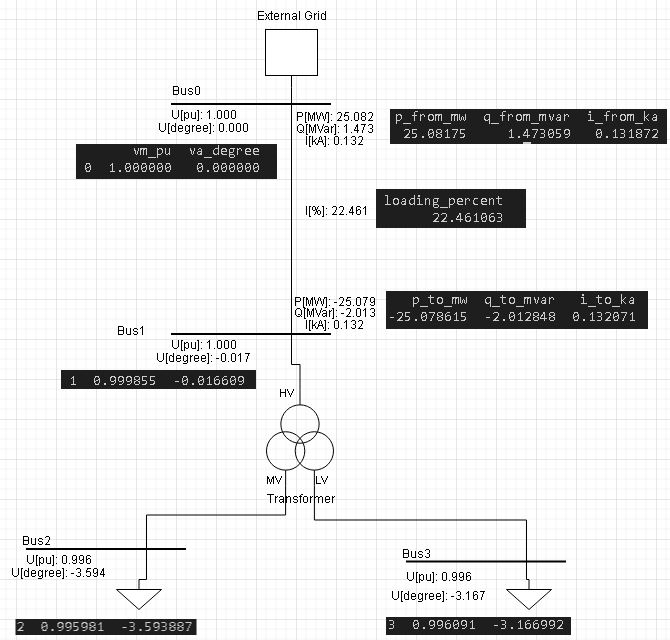
The first question is answered by test cases: the same network is built once in Electrisim and once directly in pandapower, and the results must be identical. The example below is the three-winding transformer test. The results on the dark background are from pandapower.
pandapower compared with PowerFactory
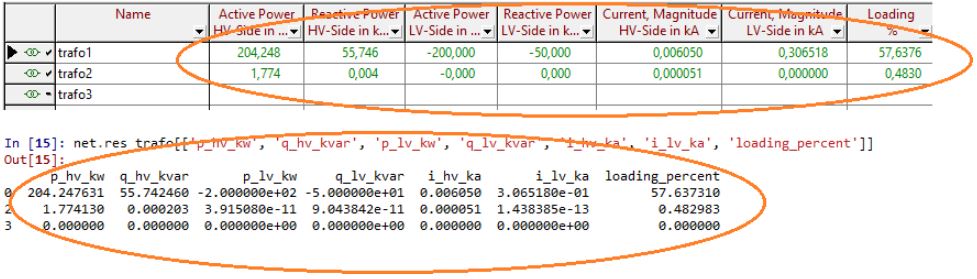
The second question is answered by the engine developers. According to the pandapower website, every pandapower element has a result test that compares its load flow results with DIgSILENT PowerFactory or PSS Sincal. Two examples from that test suite, for bus voltages and for a transformer:

A study by Fernández-Guillámon and others [1] ran the Newton-Raphson load flow on the WSCC 9-bus system, in its standard form and with added wind generation, in PowerFactory, PowerWorld, pandapower and MATPOWER. It concluded that the open-source packages are a real alternative for power flow and renewable integration studies. The article open-source power flow tools benchmarked against PowerFactory covers more of these comparisons.
pandapower compared with OpenDSS
Because Electrisim has two load flow engines, you can solve the same network with both and compare them. The Solver Cross-Check puts the two results side by side, bus by bus and branch by branch. On a balanced network they should agree closely. Where they do not, the reason is almost always a difference in how an element is modelled, not an error in either solver. pandapower vs OpenDSS load flow results explains the usual causes, and the 450 MW offshore wind case shows a full comparison on a real model.
Electrisim compared with NEPLAN
In a thesis at the University of Palermo, a simplified 10-bus model of the Italian transmission grid was built in Electrisim and in NEPLAN and the results were compared, before HVDC links were added. See the validation study and the Italian Hypergrid model, which is available as a template.
The tools at a glance
| Tool | Type | Where it runs |
|---|---|---|
| Electrisim | Single-line diagram editor and study tool using pandapower, OpenDSS and ANDES | Web browser |
| pandapower | Open-source Python library (BSD licence) | Python, on your computer or a server |
| OpenDSS | Open-source distribution system simulator from EPRI | Windows program, or Python through OpenDSSDirect |
| MATPOWER | Open-source MATLAB package for power flow and OPF | MATLAB or GNU Octave |
| PowerFactory, PSS/E, NEPLAN, ETAP | Commercial power system analysis software | Mostly Windows desktop, with a licence |
Why two tools can give different results
When the network data really is the same, two good solvers agree to within the convergence tolerance. Larger differences nearly always come from the data or from modelling conventions:
- Transformer model. T-model or pi-model, where the magnetising branch sits, and how the tap changer and phase shift are applied.
- Line charging. Whether the capacitance of lines and cables is included. For long cables it makes a large difference to the reactive power.
- Load model. Constant power, constant current and constant impedance loads give different results as soon as the voltage is not 1.0 pu.
- Generators and the slack. Which bus is the slack, whether reactive power limits are enforced, and how a distributed slack is shared.
- Units and bases. Ohms or per unit, the base power, and whether a value is per phase or for all three phases.
How to compare a model yourself
- Start with a small test case that both tools have, such as the IEEE 4-bus, 5-bus or 6-bus systems, so the data is the same on both sides.
- Compare bus voltages (magnitude and angle) first, then branch flows, then losses. A voltage difference points to the data; a flow difference with the same voltages points to the branch model.
- Add elements one at a time to find the one that makes the results diverge.
- In Electrisim, use the Solver Cross-Check to compare pandapower with OpenDSS on the same diagram.
Try it on your own network in the Electrisim app: model, simulate and compare results in a web browser, with nothing to install.
References
- A. Fernández-Guillámon, A. Molina-García, K. Das and M. Altin, “Comparison of different tools for power flow analysis with high wind power integration”, 2019 International Conference on Clean Electrical Power (ICCEP), July 2019.